
The catalogue shelves behind this JoyaGoo Spreadsheet
Browse by category, open a listing, then paste it into JoyaGoo. The search box takes any product word; the shelves below are a starting point.
Sixteen illustrated categories
The same sixteen categories as the home page, with practical buying notes. Category order does not establish the weight of a particular item. Each card opens live catalogue results; prices and stock there belong to the original sellers.
 JewelleryCheck the exact material, dimensions and seller; fixed parcel fees can matter for a small order.Category
 HatsLight and squashable, so the per-parcel charges dominate a small box.Category
 T-shirtsCheck quantity and packed weight; a small extra amount can cross a billing step.Category
 WomenswearSearch results rather than one category, so weights vary a lot.Search results
 HoodiesFleece adds weight fast, which shrinks the fixed-fee share.Category
 SweatpantsMid-weight shelf; check the struck total, not only the red one.Category
 JeansDenim is heavy for its size, so freight leads the bill.Category
 BagsEmpty bags weigh more than they look once boxed.Category
 OuterwearBulky items may trigger size-based billing; compare the route’s actual rule.Category
 SneakersInclude shoe boxes and packing in your weight and dimensions estimate.Category
 Sports jerseysConfirm team, season, size and any personalisation.Category
 BeltsCheck usable length and buckle dimensions.Category
 EyewearConfirm frame width, lenses and included case.Category
 PerfumeConfirm liquid acceptance before paying.Category
 WatchesCheck case size, movement and battery restrictions.Category
 ElectronicsConfirm model, voltage, battery and route acceptance.Category
Additional buying checks
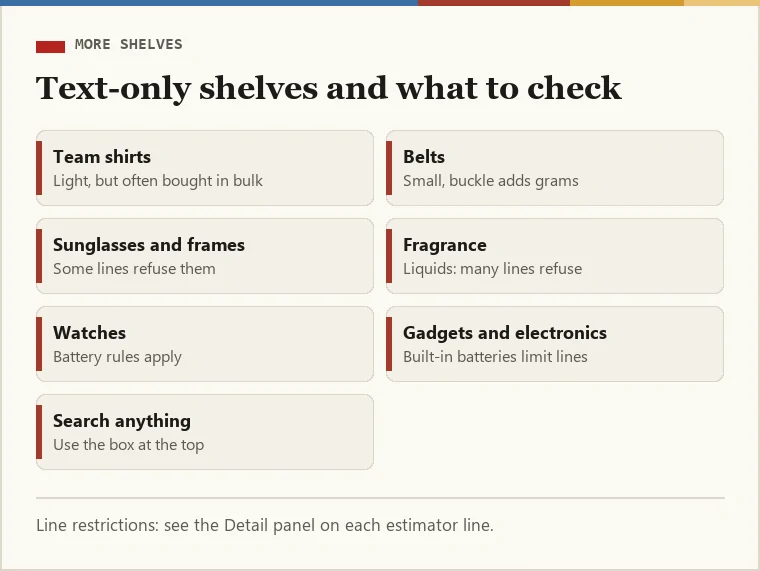
These categories exist in the catalogue too. Use these text links for the additional product types, then check the exact listing and route restrictions.
Two practical notes before you open them. Watches, fragrance and anything with a battery are refused by many shipping lines, so check the line restrictions in the JoyaGoo estimator before buying. Team shirts bought in bulk add weight quickly once packed.
Team shirtsBeltsSunglasses and framesFragranceWatchesGadgets and electronics
Each link opens live catalogue results for that category; the photographs and prices you see there belong to the sellers.
Reading a catalogue entry before pasting it
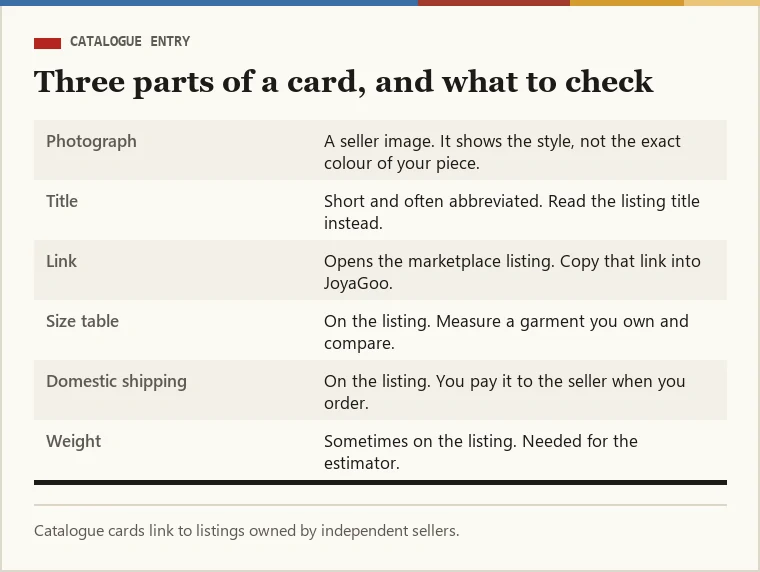
A catalogue card gives you three things: a photograph, a short title and a link to the marketplace listing. The listing is where the facts live. Open it and read the seller’s own size table, the colour options and the domestic shipping charge, because JoyaGoo buys exactly what the link and your chosen options say.
Take the link from the listing itself rather than from the catalogue card. On JoyaGoo you paste it into the search bar on the home page, which accepts Taobao, Tmall, JD, 1688 and Weidian links, and the product page opens with the seller’s options to pick from.
Note the item’s weight if the listing gives one. You will need a rough parcel weight later when you ask the estimator what shipping costs, and that is where the red figure appears.
A sale badge is not the specification
Open the seller’s page and select your size, colour and quantity before judging the price. Check material, measurements and included pieces. The lowest figure can refer to another option, and identical photos can be used by shops selling different versions. Save the exact listing and selected wording rather than only a screenshot of the red number.
The Spreadsheet helps you discover a candidate; JoyaGoo processes the purchase and warehouse stages after you submit a request. A promotion does not reserve stock, certify authenticity or confirm an onward route. If a discount is the reason to buy, establish what it reduces and whether the actual chosen item qualifies before paying. Product value and parcel cost still need their own checks.
Why light parcels feel the fixed fees most
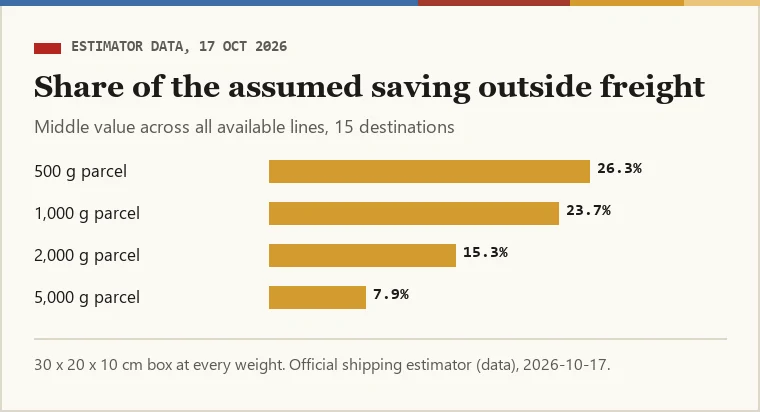
Freight grows with weight. The operation fee, the service fee and the customs and declaration fee do not: they are charged once per parcel. So the lighter your parcel, the bigger the part of the struck total that never changes, and the bigger the part of the red figure’s assumed saving that sits on those fixed charges.
In our 17 October 2026 snapshot the middle value was 26.3% of the assumed saving on non-freight bands for 500 g parcels, 23.7% at 1,000 g, 15.3% at 2,000 g and 7.9% at 5,000 g. That is why the shelves on this site run from the lightest items to the heaviest. The actual fee mix depends on the packed weight, dimensions, destination and line; a category cannot determine it.
Deciding what to order from a shelf
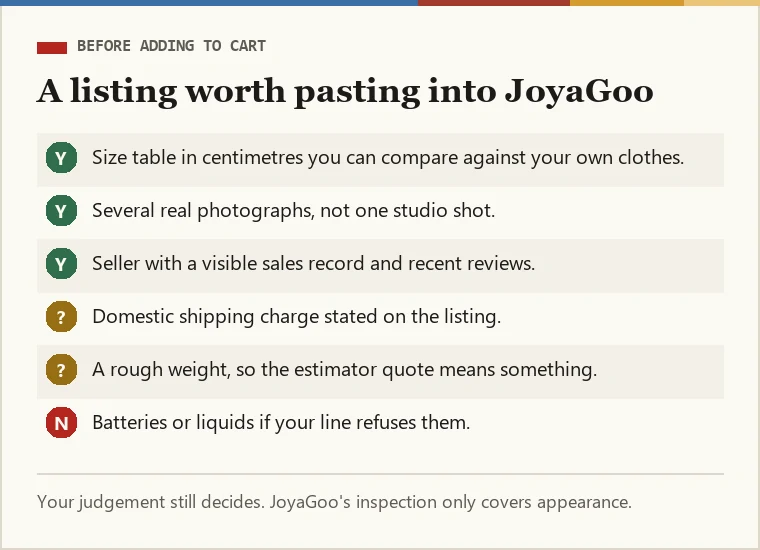
Start from what you would wear or use, then judge the listing rather than the photograph. A listing worth ordering has a size table in centimetres, several real photographs rather than one studio image, and a seller with a visible sales record.
Then think about the parcel, not just the item. One light item on its own carries the full set of fixed fees; on a 500 g parcel those fees can be a third of the struck total. We do not tell you to combine or split parcels, because that depends on lines and timing you know better than we do, but it helps to know where the money goes before you check out.
Our longer notes on judging what to buy cover sellers, listings and how to tell whether a spreadsheet site is maintained.
After choosing a catalogue find
Found something? Copy the listing link into JoyaGoo, then run a parcel weight through the estimator and the audit before you pay for shipping.
JoyaGoo shipping estimatorRun the red-figure auditJoyaGoo home page